Happy Leap Day 2012!!!! This is my first time blogging during a leap year, so I had to have a post go up today. I also have some fun PERSONAL news to share at the end of this post if you are interested. Anyway, I thought it would be fun to do a cute little frog card to represent LEAP DAY and my happy news too.
This is a shape card that I made using my Gypsy. I used the frog from the Paisley cartridge because it looks like he is ready to jump or leap. The lilly pad is from the Create-a-Critter cartridge. That super cute frog face is from a Peachy Keen Stamps set called Baby Animal Faces 3". And the awesome sentiment is from My Creative Time's Just a Little Note to Say. I think it is perfect for this card!
As for the PERSONAL news I wanted to share the reason why I'm 'jumping for joy'. I'm happy to finally share with all of you that my husband and I are going to be having a baby BOY! We have two very sweet girls and are very happy to be adding a little boy to our family at the beginning of the summer. YAY! We are SO super EXCITED (JUMPING FOR JOY)! I also want to share a link to the sweet card that my Crafting Bestie Pam sent to me when she learned of the happy news. Click HERE to see her card. She is quite the enabler because now I think that I NEED the cartridge she used for this card. If any of you know where I can find the 9 Months Cricut Lite cartridge for LESS than $40, will you PLEASE let me know. Have a terrific LEAP day and I hope you find something to JUMP for JOY about today! Huge Hugs- Glora
Items Used:
*Paisley Cricut Cartridge
*Create a Critter Cricut cartridge
*My Creative Time stamps - Just a Little Note to Say...
*Peachy Keen Stamps - Baby Animal Faces 3"
*Sakura White Gellyroll Pen
*Bic Sharpie Fine Point Pen
*Glossy Accents
Wednesday, February 29, 2012
Tuesday, February 28, 2012
D.H. Scrubby Tech Tip: The Life-Cycle of Windows
Glora's husband fancies himself a writer and a technology enthusiast (code for "likes expensive toys"). As a guest writer for Glora's Crafts, he writes articles which might be interesting to the crafting and blogging community.
I also find that many people unknowingly run software that is past its "product life cycle." This means that they are no longer receiving security updates for the program – a very dangerous situation! Without patches and updates, your computer becomes more easily vulnerable to viruses, spam, or malware.
Since 74% of visitors to this blog use a version of Windows, today I'll help you check your version, and learn what you can do if you are behind the times.
First, click the 'Start' button.
Find something that says "My Computer" or "Computer" and right-click it.
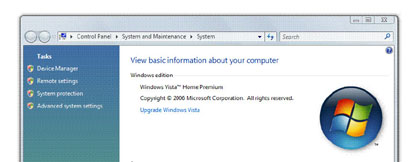
On the next window, you will see what version of Microsoft Windows you are running.
For many of you, it will look like one of these examples:
Now that you know what version you run, what should it mean to you?
In my day-job, I have found that many people do not know what version of Windows they use. If you are one of those people, don't worry. That is why you keep nerds like me around – to keep things running smoothly for you.
I also find that many people unknowingly run software that is past its "product life cycle." This means that they are no longer receiving security updates for the program – a very dangerous situation! Without patches and updates, your computer becomes more easily vulnerable to viruses, spam, or malware.
Since 74% of visitors to this blog use a version of Windows, today I'll help you check your version, and learn what you can do if you are behind the times.
First, click the 'Start' button.
Find something that says "My Computer" or "Computer" and right-click it.
A menu will drop-down. From the bottom of that menu, select "Properties"
On the next window, you will see what version of Microsoft Windows you are running.
For many of you, it will look like one of these examples:
Now that you know what version you run, what should it mean to you?
Windows 95, 98, 98se, ME, or 2000
These versions are very much out-of-date. You can unplug your computer from the Internet and safely use it off-line, but being connected is a dangerous proposition.
"Microsoft Windows XP" with no service pack "Microsoft Windows XP" and "Service Pack 1" "Microsoft Windows XP" and "Service Pack 2"
You are out of date, but a free upgrade exists. Upgrade to Service Pack 3. Click Start, All Programs, Accessories. Run the program "Windows Update" or "Microsoft Update." Follow the prompts. You may have to install some other updates in preparation for Service Pack 3, so be prepared to go back to the Windows Update site repeatedly until it offers no more updates.
"Microsoft Windows XP" and "Service Pack 3"
You are using a current version. Check Windows Updates periodically for new patches. However, you should remember this date: April 08, 2014! From now until then, you should start making some plans. After April 08, 2014, there will be no more updates offered for Windows XP. Ever. You can unplug your computer from the Internet and safely use it off-line, but being connected will become a dangerous proposition.
If your computer has enough horsepower to handle it, you could upgrade Windows to version 7 or 8 (expected to release at the end of 2012). However, this is a big deal – updating Windows usually means backing up your computer, deleting everything on the machine, installing the new version of the Windows operating system, and then spending days reinstalling all of the software that you use. Not to mention possibly needing to purchase a new printer, scanner, or other compatible accessories. My recommendation – save your pennies, and be ready to go computer shopping before April 8, 2014. After all, you'll need a newer, faster system by then anyway, right?!
"Microsoft Windows Vista" with no service pack "Microsoft Windows Vista" and "Service Pack 1"
You are out of date, but a free upgrade exists. Upgrade to Service Pack 2. Click Start, and type "Windows Update" into the search bar. Follow the prompts. You may have to install other updates in preparation for Service Pack 2, so be prepared to go back to the Windows Update program repeatedly until it offers no more updates.
"Microsoft Windows Vista" and "Service Pack 2" You are using a current version. No "end of life" date has been announced (although the date of 11 April 2017 has been tossed around as a possibility). Check Windows Updates periodically for new patches.
"Microsoft Windows 7"
You are out of date, but a free upgrade exists. Upgrade to Service Pack 1. Click Start, and type "Windows Update" into the search bar. Follow the prompts. You may have to install some other smaller updates in preparation for Service Pack 1, so be prepared to go back to the Windows Update program repeatedly until it offers no more updates.
"Microsoft Windows 7" and "Service Pack 1"
You are just fine. No "end of life" date has been announced. Check Windows Updates periodically for new patches.
All of this information is provided as a courtesy, and I am not responsible for changes, errors, omissions, or especially the policies of Microsoft!
For official information about Microsoft Product Lifecycles, please visit http://support.microsoft.com/gp/lifeselect
Comments are always welcome - however, please understand that I cannot provide technical support for your situation. If you run into trouble, seek out professional assistance (that is, invite the neighborhood nerd over and offer him a doughnut).
Monday, February 27, 2012
Cupid Brought Us Together...
I want to share one last Valentine card before February is over. I just finished this one up on Saturday so I will have to hold onto it until next year, but I HAD to make a card with this cute little cupid stamp I got from Peachy Keen Stamps. It is called Cupid's Sting.
I colored it with Copics, added gellyroll details and lots of glitter paint and stickles. I used a perfect sentiment from My Creative Time's You Had Me At Chocolate stamp set and I also used her Stitched Oval Die. I added a little bling and then I was done. Have a SUPER Monday! Hugs- Glora
Items Used:
My Creative Time stamps - You Had Me At Chocolate
My Creative Time Dies - Stitched Oval
Peachy Keen Stamps - Cupid's Sting
Copics
Stickles and shimmer paint
Gellyroll Pen
Adhesive Rhinestones
Saturday, February 25, 2012
Join in the PEACHY Fun this Weekend...
I hope you will come and join in the fun at the Peachy Keen Connection. There are two awesome challenges up and awesome prizes available for joining in the fun. Check out all the details at the top of the home page HERE.
I have a quick note card to share using some of the newly released stamps.
I used the March 2012 Stamp of the Month for the mushroom and its darling face. The cute mushroom background was made using the Mushroom Soup background stamp. Anyway, I hope to see you on the PKS Connection this weekend. We had lots of fun chatting this morning! Hugs- Glora
Items Used:
*Peachy Keen Stamps - March 2012 Stamp of the Month
*Peachy Keen Stamps - Mushroom Soup
*Copics
*Clear Embossing Powder
*Sakura Gellyroll Pen
*EK Success Paper Punch
*Chalk
I have a quick note card to share using some of the newly released stamps.
I used the March 2012 Stamp of the Month for the mushroom and its darling face. The cute mushroom background was made using the Mushroom Soup background stamp. Anyway, I hope to see you on the PKS Connection this weekend. We had lots of fun chatting this morning! Hugs- Glora
Items Used:
*Peachy Keen Stamps - March 2012 Stamp of the Month
*Peachy Keen Stamps - Mushroom Soup
*Copics
*Clear Embossing Powder
*Sakura Gellyroll Pen
*EK Success Paper Punch
*Chalk
Thursday, February 23, 2012
Peachy Keen Challenge #5
Today is the start of another Peachy Keen Challenge. We are making 3D projects that have to do with the weather (no cards and no layouts).
I made a sweet little spring gift box.
I used the Spring Holiday Cards Cricut cartridge for the box. I just made the box as large as I could on my Gypsy. It turned out to be a very nice size. The scallop and circle are from the Mini Monograms Cricut cartridge. And this adorable little spring chicken and umbrella are from a set called Shower Peepers. This is one of those darling stamp/ die combos that Peachy Keen Stamps and Cottage Cutz make together. This little chickie was just too cute not to make up for the weather theme.
I tried something new for me, I cut everything on white cardstock and colored her with Copics and some chalk. My friends Lorie and Janice do this A LOT and I wanted to give it a try. I really love the extra depth and dimension it adds to the dies, I will definitely be trying this again.
I hope you will join in on this fun PKS challenge and I'm really looking forward to some of the sweet spring rain! Hugs- Glora
Items Used:
Spring Holiday Cards Cricut cartridge
Mini Monograms Cricut cartridge
Peachy Keen- CottageCutz - Shower Peepers
Copics
Chalks
Twine from The Twinery
Adhesive Pearls
Ribbon
Peachy Keen Stamps - March Stamp of the Month Sneak Peek
Hello sweet crafty friends. Today I have a project to share using the March 2012 Stamp of the Month stamp set by Peachy Keen Stamps. If you like gnomes you are going to LOVE this set. Oh and the add on sets, they coordinate beautifully and perfectly.
When I saw this sentiment I just had to make up this card for my husband. You see he never tells me what he wants for his birthday and when I ask him he will usually end up saying something like buy some more stamps for yourself or something (which I don't do, I ALWAYS find him something that he will enjoy, but he will love this card because of the inside joke). Anyway, here it is:
Anyway, how fun is that? The stump, door and windows, mushroom, sentiment and gnome girl are all on this awesome new set (plus LOTS of other stuff). Make sure to check out the Peachy Keen blog for more sneaks of these stamps! They will be available for purchase on Saturday at 8am EST. Until then we will have lots of fun sneaks for you to look at and enjoy on the PKS blog! Hugs- Glora
Items Used:
*Create a Critter Cricut cartridge (clouds only)
*Peachy Keen Stamps - March 2012 Stamp of the Month
*Tim Holtz Distress Ink
*SEI patterned paper (for dress)
*Sakura Gellyroll Pen
Wednesday, February 22, 2012
3D Wednesday with My Creative Time - St Patty's Day Treats
Hello and welcome to another 3D Wednesday at My Creative Time.
For my project today I made little St Patty Day treat holders. My mother-in-law had brought my girls the cutest Valentine treats in containers just like this (except with a heart cut out and they were pink and red but you get the idea - the STYLE was the same). Anyway, after my girls had taken the candy out I opened it up and saw how easy it would be to replicate in my Gypsy and so I did.
All it took was a rectangle from Plantin' Schoolbook (3" by 8") welded to a scallop edge from Plantin' Schoolbook (3" wide). Then I added a shamrock from the Designer's Calendar cartridge (add it upside down because when you assemble it will end up right side up). I cut it out and then I scored it a 3.25", 4.75" and 8" and voila, I was done with the basic container.
After cutting and scoring I decided to clear emboss the front with the cute Lucky Day Shamrock background stamp by Peachy Keen Stamps and I added a fun sentiment from Emma's darling I Believe in Leprechaun's stamp set. I REALLY love these two sentiments I used because they are PERFECT to use ANY time of the year.
For the candy I put it in a tiny treat bag and stapled it in place. Then I added the white scallop piece to cover the staple and a little bit of twine and I was done. Easy but cute. I hope you enjoyed these. I can't wait to see what Emma and the rest of the design team have in store for us! Hugs- Glora
Items Used:
Plantin' Schoolbook Cricut cartridge
Designer's Calendar Cricut cartridge
My Creative Time stamps - I Believe in Leprechaun's
Peachy Keen Stamps - Lucky Day Shamrock
Clear Embossing Powder
Twine from The Twinery
Subscribe to:
Posts (Atom)
>