As
you know, Facebook keeps "adjusting" the way things work. For example, even though you have signed up to "Like" your favorite pages, the things they post might not actually show up on your news feed (unless they pay extra money to Facebook to promote their post).
The good news is that you can do something about it, to never miss a post!
1. Go to Glora's Crafts' Facebook page (or any other favorite page)
2. Hover over the "Like" button ("Like" it first if you haven't yet).
3. Check "Get Notifications"
It's that easy! You won't miss another post from your favorite page!
Glora's husband fancies himself a writer and a technology enthusiast (code for "likes expensive toys"). As a guest writer for Glora's Crafts, he writes articles which might be interesting to the crafting and blogging community.Comments are always welcome - however, please understand that I cannot provide technical support for your specific situation. If you run into trouble, seek out professional assistance (that is, invite the neighborhood nerd over and offer him a doughnut).
Showing posts with label Technical Tip. Show all posts
Wednesday, December 12, 2012
Wednesday, May 30, 2012
D.H. Scrubby Tech Tip: Will the Internet stop working July 9?
Glora's husband fancies himself a
writer and a technology enthusiast (code for "likes expensive toys").
As a guest writer for Glora's Crafts, he writes articles which might be
interesting to the crafting and blogging community.
You may have heard a rumor going
around that FBI is going to shut down the Internet on July 9.
While that is probably not true for
most people, the Internet may go dark for some people because
the FBI will turn off a certain server on that date.
Maybe I better explain from the
beginning.
In 2007, a sophisticated virus
called DNSChanger was released and quickly infected millions of computers. The
malware would reroute your requests to view a webpage to hacker-created
websites, where cyber-criminals made at least $14 million in showing online
advertisements. (Who says advertizing doesn't pay?) DNSChanger also
prevents infected computers from updating or using anti-virus software, leaving
them vulnerable to even more malicious software.
Forward to November 2011: The FBI
arrested six Estonian nationals (yes, I had to look up Estonia too) and seized the servers
where infected users were being redirected. Because of the number of users who
were unknowingly being directed through these servers, a court order instructed
the FBI put up surrogate servers in place of the malicious ones so as not to
disrupt the Internet service for millions.
That court order runs out on July 9.
When the servers come down, infected computers will no longer find the
Internet.
So, how can you know if you are
infected with DNSChanger?
Visit this FBI website: https://forms.fbi.gov/check-to-see-if-your-computer-is-using-rogue-DNS.
Click one of the links at the bottom of the page (appropriate to the language
you speak). You'll know instantly.
If you are infected, how can you fix
it?
Unfortunately, the program is a
rootkit type of virus, which means it buries itself deep into the system,
requiring intensive work to get rid of it. The safest course is to back up your
important data, reformat your hard drive(s), and reinstall your operating
system (easier said than done).
If you want to attempt removal on
your own, several antivirus companies have released free removal utilities. One
example includes Kapersky Labs free rootkit removal tool.
Good luck, and may the Internet stay
on for you!
Comments are always
welcome - however, please understand that I cannot provide technical support
for your situation. If you run into trouble, seek out professional assistance
(that is, invite the neighborhood nerd over and offer him a doughnut).
Tuesday, February 28, 2012
D.H. Scrubby Tech Tip: The Life-Cycle of Windows
Glora's husband fancies himself a writer and a technology enthusiast (code for "likes expensive toys"). As a guest writer for Glora's Crafts, he writes articles which might be interesting to the crafting and blogging community.
I also find that many people unknowingly run software that is past its "product life cycle." This means that they are no longer receiving security updates for the program – a very dangerous situation! Without patches and updates, your computer becomes more easily vulnerable to viruses, spam, or malware.
Since 74% of visitors to this blog use a version of Windows, today I'll help you check your version, and learn what you can do if you are behind the times.
First, click the 'Start' button.
Find something that says "My Computer" or "Computer" and right-click it.
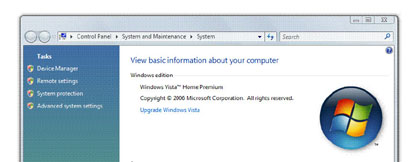
On the next window, you will see what version of Microsoft Windows you are running.
For many of you, it will look like one of these examples:
Now that you know what version you run, what should it mean to you?
In my day-job, I have found that many people do not know what version of Windows they use. If you are one of those people, don't worry. That is why you keep nerds like me around – to keep things running smoothly for you.
I also find that many people unknowingly run software that is past its "product life cycle." This means that they are no longer receiving security updates for the program – a very dangerous situation! Without patches and updates, your computer becomes more easily vulnerable to viruses, spam, or malware.
Since 74% of visitors to this blog use a version of Windows, today I'll help you check your version, and learn what you can do if you are behind the times.
First, click the 'Start' button.
Find something that says "My Computer" or "Computer" and right-click it.
A menu will drop-down. From the bottom of that menu, select "Properties"
On the next window, you will see what version of Microsoft Windows you are running.
For many of you, it will look like one of these examples:
Now that you know what version you run, what should it mean to you?
Windows 95, 98, 98se, ME, or 2000
These versions are very much out-of-date. You can unplug your computer from the Internet and safely use it off-line, but being connected is a dangerous proposition.
"Microsoft Windows XP" with no service pack "Microsoft Windows XP" and "Service Pack 1" "Microsoft Windows XP" and "Service Pack 2"
You are out of date, but a free upgrade exists. Upgrade to Service Pack 3. Click Start, All Programs, Accessories. Run the program "Windows Update" or "Microsoft Update." Follow the prompts. You may have to install some other updates in preparation for Service Pack 3, so be prepared to go back to the Windows Update site repeatedly until it offers no more updates.
"Microsoft Windows XP" and "Service Pack 3"
You are using a current version. Check Windows Updates periodically for new patches. However, you should remember this date: April 08, 2014! From now until then, you should start making some plans. After April 08, 2014, there will be no more updates offered for Windows XP. Ever. You can unplug your computer from the Internet and safely use it off-line, but being connected will become a dangerous proposition.
If your computer has enough horsepower to handle it, you could upgrade Windows to version 7 or 8 (expected to release at the end of 2012). However, this is a big deal – updating Windows usually means backing up your computer, deleting everything on the machine, installing the new version of the Windows operating system, and then spending days reinstalling all of the software that you use. Not to mention possibly needing to purchase a new printer, scanner, or other compatible accessories. My recommendation – save your pennies, and be ready to go computer shopping before April 8, 2014. After all, you'll need a newer, faster system by then anyway, right?!
"Microsoft Windows Vista" with no service pack "Microsoft Windows Vista" and "Service Pack 1"
You are out of date, but a free upgrade exists. Upgrade to Service Pack 2. Click Start, and type "Windows Update" into the search bar. Follow the prompts. You may have to install other updates in preparation for Service Pack 2, so be prepared to go back to the Windows Update program repeatedly until it offers no more updates.
"Microsoft Windows Vista" and "Service Pack 2" You are using a current version. No "end of life" date has been announced (although the date of 11 April 2017 has been tossed around as a possibility). Check Windows Updates periodically for new patches.
"Microsoft Windows 7"
You are out of date, but a free upgrade exists. Upgrade to Service Pack 1. Click Start, and type "Windows Update" into the search bar. Follow the prompts. You may have to install some other smaller updates in preparation for Service Pack 1, so be prepared to go back to the Windows Update program repeatedly until it offers no more updates.
"Microsoft Windows 7" and "Service Pack 1"
You are just fine. No "end of life" date has been announced. Check Windows Updates periodically for new patches.
All of this information is provided as a courtesy, and I am not responsible for changes, errors, omissions, or especially the policies of Microsoft!
For official information about Microsoft Product Lifecycles, please visit http://support.microsoft.com/gp/lifeselect
Comments are always welcome - however, please understand that I cannot provide technical support for your situation. If you run into trouble, seek out professional assistance (that is, invite the neighborhood nerd over and offer him a doughnut).
Sunday, October 16, 2011
D. H. Scrubby's Tech Tips: Using an RSS Feed
Glora's husband fancies himself a writer and a technology enthusiast (code for "likes expensive toys"). As a guest writer for Glora's Crafts, he writes articles which might be interesting to the crafting and blogging community.
3.In the New RSS Feed dialog box, type the URL of the RSS Feed. For example:
To begin following a new feed, select the Feed button from the toolbar.
"So many blogs! So little time!" cried Glora, as she explained that she wanted to "follow" more blogs, yet clicking another Google Friend Connect "Join This Site" button was going to overload Google's Reading List and overwhelm her ability to catch up on everyone - especially on her most favorite sites.
The technology solution: Use a Really Simple Syndication (RSS) feed reader.
"Syndication" means the distribution of content, and "Really Simple" describes the way we want it! As new content is posted to a blog, behind-the-scenes a file (known as an RSS file) is updated. By pointing a RSS reader software to this file, it can scan the pages for you. When something new shows up, you are alerted in a way similar to receiving a new email in your inbox.
Our solution was to go ahead and publicly follow as many sites as she wanted. Blogger / Google's reading list would no longer be as relevant, because her feed reader would contain the updates she was most interested in seeing.
To make this work, you will need to know the secret RSS link for each blog.
Helpful hint: Almost all Blogger sites simply add this code to the end of the site address: /rss.xml
For example, the RSS feed for http://glorascrafts.blogspot.com is http://glorascrafts.blogspot.com/rss.xml
Helpful hint: Almost all Blogger sites simply add this code to the end of the site address: /rss.xml
For example, the RSS feed for http://glorascrafts.blogspot.com is http://glorascrafts.blogspot.com/rss.xml
Bonus Computer Jargon Hint: Because computer people like to come up with new words, RSS Readers are also known as "Feed Aggregators."
Since the vast majority of Glora's Crafts readers use Microsoft Windows based systems, I will offer two Windows-based solutions.
Microsoft Office Outlook (http://office.microsoft.com/en-us/outlook/)
- If you already own a license for Microsoft Outlook, then it can do the job. If you don't own Microsoft Outlook, do not rush out and buy it only for this purpose! Skip down to Windows Live Mail for a free solution.
Step 1 for Microsoft Outlook 2007: Click the Tools menu. Select Account Settings.
Step 1 for Microsoft Outlook 2010:
Click the File tab. Click Account Settings, and then select Account Settings.
The remaining steps apply to both versions.
2.On the RSS Feeds tab, click New
3.In the New RSS Feed dialog box, type the URL of the RSS Feed. For example:
http://simply-pam.blogspot.com/rss.xml
5.Click OK.
Windows Live Mail (http://explore.live.com/windows-live-mail)
- This program is free when you register for a Hotmail or Windows Live email account. (bonus tip: if you are using Microsoft Outlook Express, you really owe it to yourself to upgrade to this little beauty!)
When you start up Windows Live Mail, it will default to the Mail portion of the program.
In the lower-left corner, click Feeds.
To begin following a new feed, select the Feed button from the toolbar.
Enter the RSS feed address for the blog you want to follow. For example: http://glorascrafts.blogspot.com/rss.xml
Click OK.
Just like that, your reader grabs the most recent posts. You may read them in the same way that you would an email.
Add a few more of your favorite blogs. For example:
http://glorascrafts.blogspot.com/rss.xml
http://simply-pam.blogspot.com/rss.xml
http://simply-crafts.blogspot.com/rss.xml
These are the two programs that I have tried. If you don't like Microsoft, don't have a compatible version of Windows or Outlook, or just want to try something different, here is a list of additional programs to consider:
Comments are always welcome - especially other tips, tricks, or recommendations of aggregators that work well for you. However, please know that I cannot provide technical support for your situation. If you run into trouble, seek out professional assistance (that is, invite the neighborhood nerd over and offer him a doughnut).
Subscribe to:
Posts (Atom)
>